Error Codes
Below is an exhaustive list of all the error codes that you may encounter when interacting with our Payments API, for both Checkouts, Payments and Refunds.
insufficient_funds101The user has a valid account with the gateway but his funds or his credit limit are below the checkout amount.
wrong_credentials405The user entered credentials that were not recognized by the gateway. Example: the user entered a phone number and a password, but the gateway is stating the password doesn't match.
user_doesnt_exist404The user entered an identifier which the gateway deemed not connected to an account, but the credentials were either found or deemed potentially existing. Example: the user entered a valid phone number and the gateway informed us there's no account tied to it.
unexpected_error_from_partner1000The gateway returned an error that was not documented in their technical docs.
unexpected_technical_error1001A defect on Orchestrapay's side, not the customer, the issuer or the gateway.
account_locked406The user account exists but is locked and it requires some form of activation or communication between the user and the gateway.
cancelled202The transaction was cancelled by the user outside of our UI, e.g. when they receive a code by Orange Money by SMS and answer No.
wrong_tenant_credentials1002The API keys that you provided for this gateway are not correct
wrong_national_id_format407The ID or Passport provided by the user has the wrong format
wrong_email_formatThe e-mail provided by the user has the wrong format
wrong_phone_format500The phone # was rejected by the gateway
wrong_card_credentials408The card details provided are not correct
rejected_by_bank700The gateway rejected this transaction specifically and did not provide further info
not_found404Orchestrapay resource not found
rate_limit_exceeded102The gateway has a rate limiting feature (they throttle our requests) and we've exceeded it
Errors with code unexpected_technical_error and unexpected_error_from_partner are constantly monitored by our team and continuously fixed.
Failure reason & Last Step
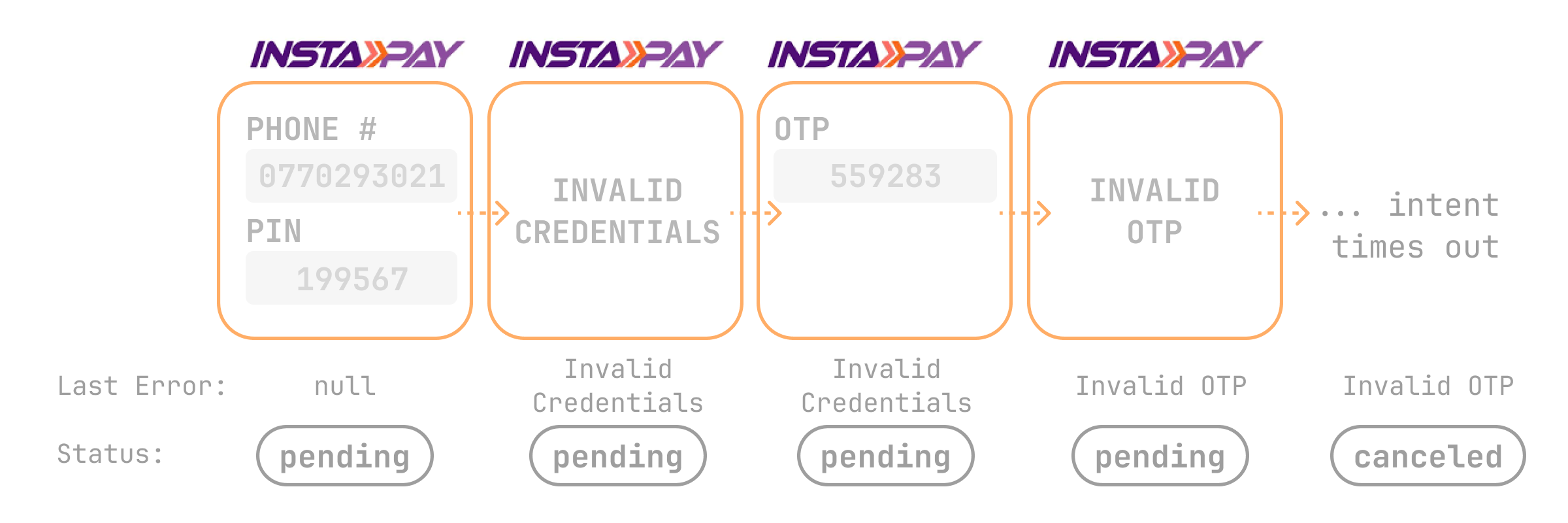 A Transaction Intent can fail several times throughout its lifecycle, so we report the failure of the last attempt. If a Transaction Intent fails several times and then succeeds, it has no failure reason.
Failure reason
A transaction that did not succeed carries a failure reason in last_reason: one line saying why it failed. It holds one of two things:
- A response code, when one names the outcome exactly, such as
insufficient_fundsororder_expired. - Otherwise, the gateway's reason in English. That is the gateway's own message when it is already clear English, or our English wording when the gateway answered in another language or with a bare code, such as
Blocked by OPay risk control. A reason we have not mapped yet arrives as the gateway wrote it.
Your integration should handle both: act on the codes below, and show or log any other value as it is. A reason longer than the field is shortened to fit and ends in …. The failure reason comes from the gateway response that ended the transaction, and a later callback for the same transaction never changes it. It is empty while the transaction is pending and when it succeeds.
The codes you can expect in a failure reason:
| Code | What happened |
|---|---|
insufficient_funds | The customer's balance or credit limit is below the amount. |
order_expired | The payment timed out before the customer completed it. |
cancelled | The customer cancelled, or the gateway ended the payment without giving a reason. |
abandoned | The customer left the payment without finishing it. |
user_doesnt_exist | The gateway has no account for the phone number or identifier the customer entered. |
wrong_credentials | The customer entered a wrong PIN or password. |
wrong_card_credentials | The card number, PIN or other card details are not correct. |
wrong_otp | The customer entered a wrong one-time code. |
otp_expired | The customer did not enter the one-time code in time. |
wrong_phone_format | The gateway rejected the phone number's format. |
account_locked | The customer's account exists but is locked or inactive, or the customer ran out of PIN attempts. |
rejected_by_bank | The issuer or lender declined the payment without a more specific reason. |
suspected_fraud | The issuer's or the gateway's fraud or risk checks blocked the payment. Retrying on the same gateway will not help. |
card_expired | The card has expired. |
card_reported_lost_or_stolen | The card was reported lost or stolen. |
card_limit_exceeded | The card's spending or withdrawal limit was reached. |
issuer_unavailable | The issuer could not be reached. |
transaction_amount_below_minimum | The amount is below the gateway's minimum. |
payment_method_not_supported | The gateway does not accept this card type or method. |
currency_not_supported | The card or method cannot pay in this currency. |
bnpl_overdue_installments | The customer has overdue installments with the lender. |
bnpl_credit_under_review | The lender is still reviewing the customer's credit. |
bnpl_first_purchase_restricted | The lender restricts the customer's first purchase. |
rate_limit_exceeded | The gateway throttled the request. |
unexpected_error_from_partner | The gateway failed without saying why, for example during an outage. |
unexpected_technical_error | A defect on Orchestrapay's side, not the customer, the issuer or the gateway. Our team is alerted and fixes it. |
The table lists the outcomes you will see most often. Any other code from the list at the top of this page can also appear, mostly on card payments, so treat a code you do not act on as a failure like any other.
Last step
Along with the failure reason, we return the last step the customer completed successfully. Last steps are gateway-specific:
| Gateway | Workflow Steps |
|---|---|
| Contact | 1. Collect National ID 2. Retrieve Tenors 3. Show Summary 4. Enter OTP |
| Instapay | 1. Authenticate 2. Poll Status |
| Premium Card | 1. Enter Card Details 2. Select Tenure 3. Enter OTP |
| Opay | 1. Redirect to Opay 2. Poll Status |
| PalmPay | 1. Redirect to PalmPay 2. Poll Status |
| Spotit | 1. Enter Phone 2. Choose Bank 3. Poll Status |
| Souhoola | 1. Authorize Payment 2. Pick Downpayment 3. Pick Tenure 4. Show Summary 5. Enter OTP |
| CredPal | 1. Enter BVN & Phone 2. Authenticate |
| Orange Money | 1. Enter Phone 2. Poll Status |
| Binga / Wafacash | 1. Authenticate 2. Poll Status |
| Diar Dzair | 1. Create Transaction 2. Poll Status |
| Mobile Money Wallet | 1. Enter Phone 2. Poll Status |
| Forsa | 1. Enter Phone 2. Select Category 3. Enter OTP |
| Easybuy | 1. Authorize Payment 2. Confirm Order 3. Poll for Status |
| Paystack Bank Transfer | 1. Enter Contact Details 2. Poll Status |
| Paystack Credit Card | 1. Enter Email 2. Redirect 3. Poll Status |